B2B Electronic Connection Solution
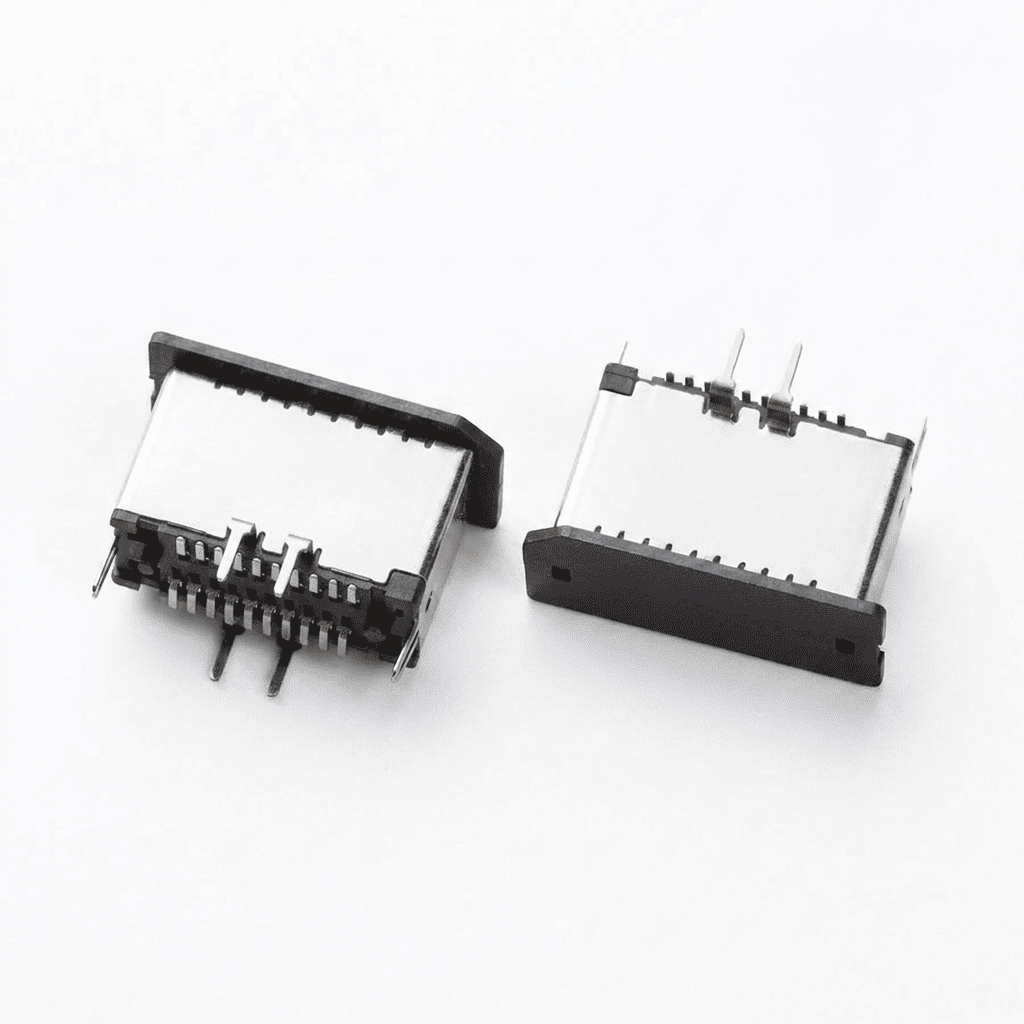
EU20F2B3N11350SR-USB 3.1 TYPE E KEY A 20PIN
Factory-backed connector sourcing and electric connection support for OEMs, distributors and electronic equipment manufacturers.
Product View
OEM Ready
Factory Supply
Fast Quote
Product Specifications
Key parameters for OEM, distributor and engineering evaluation.
- USB Connector Style
- Type E
- USB Version
- 3.1
- Interface
- A
- Waterproof
- N/A
- Approvals
- N/A
- Gender
- Receptacle (socket)
- PCB Orientation
- Horizontal
- Number of Contacts
- 2x10
- PCB Mount Position
- Top Mount
- Elevated
- No
- Mating Cycles
- 1,500
- Power Rating
- 240W
- Current Rating
- 2A
- Contact Pin Type
- Surface Mount
- Voltage Rating
- 48V DC
- Shell Stake Type
- Inner shell stake
- Locating Peg
- With
- Mating Face Lead In
- With
Product Details
Overview and Application Notes
USB 3.1 Type E often confuses buyers who expect it to mean “Gen2 speed.” In reality, it’s a board-side connector form factor, not a speed tier, and mixing it up with older headers can halt your entire production line.
USB 3.1 Type E is an internal motherboard header designed to connect front-panel USB-C modules. The “3.1” in its name refers to the specification revision that introduced Type-C support, not a guaranteed 10 Gbps transfer rate.
Understanding Type E correctly prevents costly mis-stocking, failed prototypes, and product returns that stem from confusion between connector shape and data speed.
Is USB 3.1 Type E the same as the USB 3.0 20-pin header?
No. USB 3.1 Type E and the USB 3.0 20-pin header are mechanically incompatible and use different pin assignments.
The two headers have distinct physical footprints, latch mechanisms, and pinouts. Attempting to substitute one for the other—or forcing an adapter—will result in failed connections and may damage board traces.
| Feature | USB 3.1 Type E | USB 3.0 20-pin |
|---|---|---|
| Pin count | 19 pins | 20 pins |
| Primary use | Front-panel USB-C | Front-panel USB-A |
| Mechanical key | Center latch + side pegs | Center key notch |
| Interchangeable | No | No |
The simple rule: do not substitute Type E for the 20-pin header or vice versa. Each is purpose-built for its own front-panel module and board layout. Mixing them leads to prototype failures and wasted engineering time.
How should distributors stock and label USB 3.1 Type E headers?
Stock Type E headers by application, position, and gender—not by speed claims. Clear naming prevents confusion and reduces returns.
Name and tag products as “Type E board-side receptacle (female), internal header for front-panel USB-C.” Avoid placing “Gen2” or “10 Gbps” in product titles, filters, or bullet points.
Stocking checklist for board-side Type E receptacles
Include these details on product pages to help buyers confirm fit and avoid mis-orders:
| Information | What to show |
|---|---|
| Mechanical drawing reference | Factory drawing number or link to manufacturer datasheet |
| Mounting method | Through-hole, surface-mount, retention latch, screw holes, locating pegs |
| Board thickness range | Compatible PCB thicknesses (if specified by manufacturer) |
| Mating direction | Vertical, right-angle, or horizontal |
| Keep-out zone | Height, depth, and width clearances required around the connector |
| Clear photos | Top view, side view, and mating interface |
Do not publish unverified pinouts, cable length limits, or bandwidth guarantees. Direct technical questions to the manufacturer’s official datasheet or USB-IF materials.
Conclusion
USB 3.1 Type E is a board-side header for front-panel USB-C—not a speed grade. Stock it by form factor, label it clearly, and never substitute it for the legacy 20-pin header.
Product Document
Download Product PDF
Use this document for internal review, engineering comparison, and RFQ preparation.
Build a Reliable Supply Plan for This Product
We support importers, distributors, and electronics manufacturers with product matching, alternative sourcing, assembly integration, and factory-direct production coordination.
Include These Details in Your RFQ
- 1 Target quantity, annual forecast, and delivery destination.
- 2 Drawing, datasheet, sample photo, or current supplier part number.
- 3 Electrical, mechanical, compliance, testing, and packaging requirements.
Related Options